KACE® Cloud
Release Notes
January 2025
These release notes provide information about the latest KACE Cloud release.
About this release
KACE Cloud allows you to quickly enroll mobile devices, manage their inventory, and to apply required configurations and policies. You can interact with managed devices using a standard set of commands, such as resetting a password or locking a device, as needed. This cloud-based product helps you implement your entire device management solution quickly, and ensuring that managed devices follow your organization guidelines and standards, while protecting your data integrity.
This release contains one new feature and a number of resolved issues. See New features.
Supported platforms
MDM managed devices:
The following operating systems are supported for MDM managed devices:
Android:
- Android 14.0+
Apple:
- iOS, iPadOS, tvOS15+
- macOS 13+
Windows:
- Windows 10 Professional, Enterprise, Education, 1709 or later
- Windows 11
Registered Devices:
KACE Cloud uses an agent to deliver some management functionality to Windows and macOS devices. Windows and macOS devices can be partially managed without an MDM connection through device registration. The following operating systems are supported:
Windows:
- Windows Server 2016 (Standard and Datacenter Editions with .NET Framework 4.7 or later)
- Windows Server 2019, 2022, 2025 (Standard and Datacenter Editions)
- Windows 10 Professional, Enterprise, Education, 1709 or later
- Windows 11

|
NOTE:32-bit versions of Windows are unsupported by KACE Cloud Agent. |
Apple:
- macOS 13+
Browsers:
The following browsers are supported:
- Google Chrome 109+
- Microsoft Edge 118+ (Not supported on mobile devices.)
- Mozilla Firefox 119+
- Apple Safari 12+ (Mac only)
- Opera 15.6+
System-provided mobile administrative applications are not currently available.
Registered Devices:
KACE Cloud uses an agent to deliver some management functionality to Windows and macOS devices. Windows and macOS devices can be partially managed without an MDM connection through device registration. The following operating systems are supported:
Windows:
- Windows Server 2016 (Standard and Datacenter Editions with .NET Framework 4.7 or later)
- Windows Server 2019, 2022, 2025 (Standard and Datacenter Editions)
- Windows 10 Professional, Enterprise, Education, 1709 or later
- Windows 11
|
|
NOTE:32-bit versions of Windows are unsupported by KACE Cloud Agent. |
Apple:
-
macOS 14+
New features
The new feature is introduced in KACE Cloud:
Patch Discovery
KACE Cloud now offers discovery of patches without requiring you to also deploy them, providing you greater control over the patching workflow. The key features of this are:
- Patch Discovery without immediate deployment: You can discover patches across all devices without automatically proceeding to deployment. You can deploy the discovered patches at a later time.
- View discover-only scan results without impacting compliance: You can view the results of 'discover-only' scans without affecting the current compliance. You can monitor vulnerabilities while maintaining accurate count of the compliant devices.
- Targeted discovery: You can reduce the load on your endpoints by targeting the discovery of patches for only the vendors or patches you care about.
- Differentiate Patch status with optimized Patch reporting: You can generate reports to track patches that are discovered but not deployed and those awaiting deployment. To learn more, click Create and edit reports

|
|
|

For more information, click Configure patching rules and client notification options.
User Profile Information in Device Inventory
You can now view and search for user profiles in device details. We have simplified device management by identifying devices used by specific users, including domain and local accounts.
- A new section User Profile is added to the Device Details that displays user-specific details for Windows and macOS devices.
- Optimized the Search functionality to allow partial username searches to filter devices by associated user profiles.
For complete information about these feature, visit the KACE Cloud Help Center.
See also:
Enhancements
The following is a list of enhancements implemented in KACE Cloud.
- Remote Access: You can now easily link Splashtop Streamers to active policies in Settings > Remote Access > Agents.
- Select an active policy for linking from the Policy drop-down.
- Link streamers across platforms with a single button.

You can deploy and configure Splashtop Streamer on Windows and Mac devices from the Devices > <Device> > Remote Access page.
The Configure Remote Access button installs the Splashtop Streamer app, sends the RMM code, triggers hardware inventory, and refreshes necessary status checks.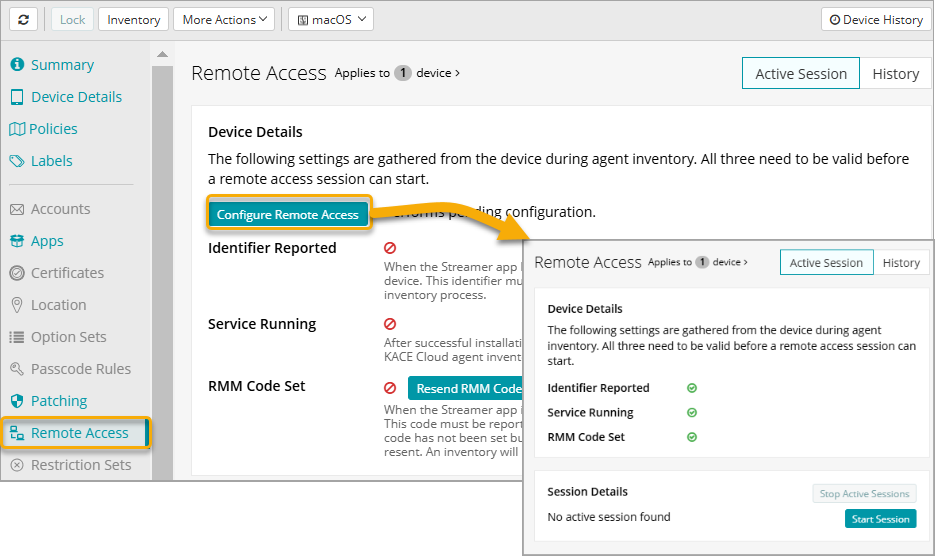
This streamlines configuration, thus saving time and effort required for linking Streamers to the policies.
- Patching History Statistic Changes
Enhancements to patching history to improve clarity and reporting of patch detection and deployment results. The changes are as follows:- Detection History:
- Renamed Patch Detection to Patch Discovery.
- Replaced Complete with Completed and removed the preceding dash.
- Display the number of uninstalled patches instead of deployed patches.
- Removed the Others section
- Deployment History:
- Renamed Patching to Patch Deployment.
- Replaced Complete with Completed and removed the preceding dash.
- Removed the Others section
- Detection History:
- New Policy Editor:
Try the beta version of our new policy editor, which makes it easier to understand the content of the policy and easier to configure it. Feedback is welcome!
Please submit your feedback for this feature to kace_beta@quest.com
- Support for new iOS and macOS:
Implement Support for new iOS and macOS restrictions rolled as part of the most recent OS updates.
Resolved issues
The following issue is addressed in this release.
Table 1: General resolved issues
| Resolved Issue | Issue ID |
|---|---|
| Updated verbiage on macOS and iOS version upgrade configurations. | 11348 |
| Reporting entity Devices incorrectly shows license type for unenrolled and discovered devices as 'MDM'. | 11168 |
| Policy Manager Location Reminders not marked as complete. | 11451 |
| Newer iOS model variants not shown in Device Details. | 11549 |
| MDM enrolled Windows devices intermittently failing to receive commands. | 11355 |
| LDAP sync intermittently fails to update recently disabled users. | 11330 |
| Improved verbiage in Enrollment Portal for Companion-only tenants. | 11630 |
| Improve performance of Windows MDM responses. | 11614 |
| Fully supervised Android EMM QR code enrollments incorrectly shown as Personal. | 11612 |
| Edited Apple Option Set cannot be removed from device once applied to device via policy. | 11530 |
| Device history records may not show statistics for patches installed at the periodic checkin. | 11289 |
| Device attempts to unenroll when assigned user that was imported by SCIM is deleted from Admin portal. | 11661 |
| Deleted VPN configuration gets deployed to Windows devices when selecting all VPN configurations. | 11360 |
| CVE information not displaying in Patch Details when viewing in Device Patching results. | 11292 |
| Changed default timeout for Reports from 3 to 5 minutes. | 11628 |
| Apple Option Set Device Naming Pattern not properly clearing from device when value is deleted from configuration. | 11401 |
| Android Option Set not always showing proper name for Cached packages. | 11204 |
| Android Agent allows access to external sites through the Privacy Policy link. | 11314 |
| Agent Inventory not always showing proper status of Windows Firewall profiles when set by GPO or local policy. | 11465 |
| Added ability to enable or disable system apps for Android EMM Fully Managed enrollments. | 11404 |
| Added "Preserve eSIM Data Plan" option to Factory Reset dialog for Apple devices. | 11321 |
| "Apply Policies Now" button not triggering policy update in all cases. | 11459 |
| LDAP Sync User Import failing to import users with email addresses containing trailing spaces. | 11344 |
| Device history may show duplicate Patching records. | 11287 |
| Apple Option Set creates device history record when no applicable settings are applied to device. | 11501 |
Known issues
The following issues are known to exist at the time of release.
Table 2: General known issues
| Known Issue | Issue ID |
|---|---|
| Admin cannot send Inventory requests to Apple devices in "Enrolling" state. | 11615 |
| Agent Inventory fails to save some apps with long version numbers and names. | 11528 |
| Android AMA devices pre-enrolled or added to Zero Touch using the IMEI do not match up to "Discovered" device record when enrolled. These devices should use the serial number. | 10504 |
| Android EMM Passcode notification not shown if device user does not allow notifications for KACE Cloud Agent. | 11324 |
| Apple OS Updates attempts are limited to 10 retries and count cannot be reset. | 10978 |
| Device alias for Apple devices is intermittently set back to default. | 11290 |
| Device network settings are missing from reports. | 10678 |
| Logged-in user and user profile data may not be collected from Windows devices disjoined from on-premise domains. | 11696 |
| Passcode configuration setting "Restrict the auto-lock timeout" requires a reboot to take effect on Windows devices. | 11313 |
| Remote Access sessions history list shows unenrolled devices as 'Unknown'. | 11278 |
| Some certificates deployed to Windows devices may be installed to local user rather than local computer. | 11506 |
| Timeout error when exporting large amounts of Reporting data to CSV. | 11509 |
| Unable to remove managed "System CA Store" certificates. | 10872 |
| Updating iOS Restriction set to change kiosk app fails when already applied to device. | 11405 |
| Windows Firewall status may not be accurate if inventory occurs immediately after the device starts. | 10384 |
| Windows Option Set configs with wallpaper settings may fail to apply with "Atomic Failed" device history message. | 10783 |
Product licensing
Subscription and licensing information is managed from the Settings page in KACE® Cloud MDM. It includes information on paid and trial subscriptions, licenses, start and end dates, available licenses, and more. For details, see About subscriptions and licensing.
More resources
Additional information is available from the following:
- Online product documentation: KACE Cloud Help Center
- Product videos: How-to Videos
About us
Quest Software creates technology and solutions that build the foundation for enterprise AI. Focused on data management and governance, cybersecurity and platform modernization, Quest helps organizations address their most pressing challenges and make the promise of AI a reality. Around the globe, more than 45,000 companies including over 90% of the Fortune 500 count on Quest Software. For more information, visit www.quest.com or follow Quest Software on X (formerly Twitter) and LinkedIn.
Technical support resources
Technical support is available to Quest customers with a valid maintenance contract and customers who have trial versions. You can access the Quest Support Portal at https://support.quest.com/kace-cloud/current.
The Support Portal provides self-help tools you can use to solve problems quickly and independently, 24 hours a day, 365 days a year. The Support Portal enables you to:
- Submit and manage a Service Request
- View Knowledge Base articles
- Sign up for product notifications
- Download software and technical documentation
- View how-to-videos
- Engage in community discussions
- Chat with support engineers online
- View services to assist you with your product
© 2025 Quest Software Inc. ALL RIGHTS RESERVED.
This guide contains proprietary information protected by copyright. The software described in this guide is furnished under a software license or nondisclosure agreement. This software may be used or copied only in accordance with the terms of the applicable agreement. No part of this guide may be reproduced or transmitted in any form or by any means, electronic or mechanical, including photocopying and recording for any purpose other than the purchaser’s personal use without the written permission of Quest Software Inc.
The information in this document is provided in connection with Quest Software products. No license, express or implied, by estoppel or otherwise, to any intellectual property right is granted by this document or in connection with the sale of Quest Software products. EXCEPT AS SET FORTH IN THE TERMS AND CONDITIONS AS SPECIFIED IN THE LICENSE AGREEMENT FOR THIS PRODUCT, QUEST SOFTWARE ASSUMES NO LIABILITY WHATSOEVER AND DISCLAIMS ANY EXPRESS, IMPLIED OR STATUTORY WARRANTY RELATING TO ITS PRODUCTS INCLUDING, BUT NOT LIMITED TO, THE IMPLIED WARRANTY OF MERCHANTABILITY, FITNESS FOR A PARTICULAR PURPOSE, OR NON-INFRINGEMENT. IN NO EVENT SHALL QUEST SOFTWARE BE LIABLE FOR ANY DIRECT, INDIRECT, CONSEQUENTIAL, PUNITIVE, SPECIAL OR INCIDENTAL DAMAGES (INCLUDING, WITHOUT LIMITATION, DAMAGES FOR LOSS OF PROFITS, BUSINESS INTERRUPTION OR LOSS OF INFORMATION) ARISING OUT OF THE USE OR INABILITY TO USE THIS DOCUMENT, EVEN IF QUEST SOFTWARE HAS BEEN ADVISED OF THE POSSIBILITY OF SUCH DAMAGES. Quest Software makes no representations or warranties with respect to the accuracy or completeness of the contents of this document and reserves the right to make changes to specifications and product descriptions at any time without notice. Quest Software does not make any commitment to update the information contained in this document.
If you have any questions regarding your potential use of this material, contact:
Quest Software Inc.
Attn: LEGAL Dept
4 Polaris Way
Aliso Viejo, CA 92656
Refer to our Web site (https://www.quest.com) for regional and international office information.
Patents
Quest Software is proud of our advanced technology. Patents and pending patents may apply to this product. For the most current information about applicable patents for this product, please visit our website at https://www.quest.com/legal.
Trademarks
Quest, the Quest logo, and Join the Innovation are trademarks and registered trademarks of Quest Software Inc. For a complete list of Quest marks, visit https://www.quest.com/legal/trademark-information.aspx. All other trademarks and registered trademarks are property of their respective owners.
Legend
|
|
Caution: A CAUTION icon indicates potential damage to hardware or loss of data if instructions are not followed. |

|
|
|

KACE Cloud Help Center
Updated - January 2025